


Install
Settings
Click the extension icon in your browser toolbar to access settings. The settings panel is the same across Chrome, Edge, Brave, and Firefox.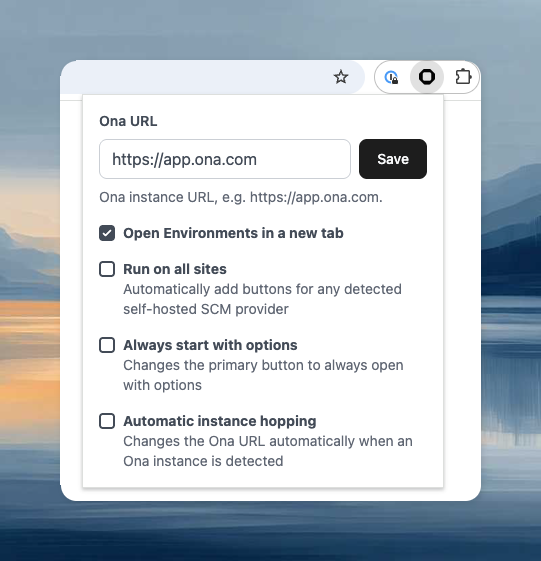
Self-hosted SCM providers
The extension works automatically ongithub.com, gitlab.com, bitbucket.org, and dev.azure.com. For self-hosted instances (GitLab CE/EE, Bitbucket Datacenter), enable Run on all sites in the extension settings, or right-click the extension icon and select Enable on this domain.
Custom Ona instance
If using a self-hosted Ona instance, open the extension settings and enter your instance URL.Migrating from Gitpod Classic
If the extension’s “Open” button launches Gitpod Classic instead of Ona, update the Ona URL:- Click the extension icon in your browser toolbar
- Either enable Automatic instance hopping and visit app.ona.com to trigger the update, or manually set the Ona URL to
https://app.ona.com