> ## Documentation Index
> Fetch the complete documentation index at: https://ona.com/docs/llms.txt
> Use this file to discover all available pages before exploring further.
# Cost & Budgets
> Understand usage and OCU billing for Core Ona Cloud organizations.
This page covers usage for **Core** organizations using Ona Cloud.
Enterprise organizations use a separate usage view and billing model. In Enterprise, usage is billed in credits rather than OCUs, and **Settings → Cost & Budgets** opens the enterprise view instead of the OCU view described here. See [User budgets](/docs/ona/billing/user-budgets) for per-user budgeting in Enterprise.
An **OCU (Ona Compute Unit)** measures resource consumption for Core plans. Your subscription balance is consumed in OCUs as you use environments and AI features.
## Access requirements
Organization admins and members with the [Billing Viewer](/docs/ona/organizations/organization-roles#billing-viewer) role can view **Settings → Cost & Budgets**. Billing Viewers can read usage data, but cannot add credits, change budgets, or update billing settings.
## Consumption rates
### Environments
OCUs are consumed while environments are running, based on size:
| Environment | Resources | Rate |
| --------------- | ------------------- | ----------- |
| Standard | 4 vCPUs / 16GB RAM | 1 OCU/hour |
| GPU-accelerated | 16 vCPUs / 64GB RAM | 7 OCUs/hour |
### Agentic tasks
Approximate OCU consumption for AI tasks:
| Task | OCUs |
| -------------------------------- | ---- |
| Explain a small codebase | 1 |
| Explain a large codebase | 3 |
| Create a new web app | 4 |
| Add a feature to medium codebase | 8 |
### Codex with a connected ChatGPT plan
If you [connect Codex to your ChatGPT account](/docs/ona/integrations/configure-codex), Codex model requests use your ChatGPT plan instead of Ona-managed model credits. Ona does not charge OCUs for that Codex model usage.
The environment still consumes OCUs while it is running. OpenAI manages ChatGPT-side rate limits and usage limits.
## Tracking your usage
To see how your organization is spending credits, go to **Settings → Cost & Budgets**. The Cost & Budgets page gives you a clear picture of your credit consumption over the last 7 or 30 days.
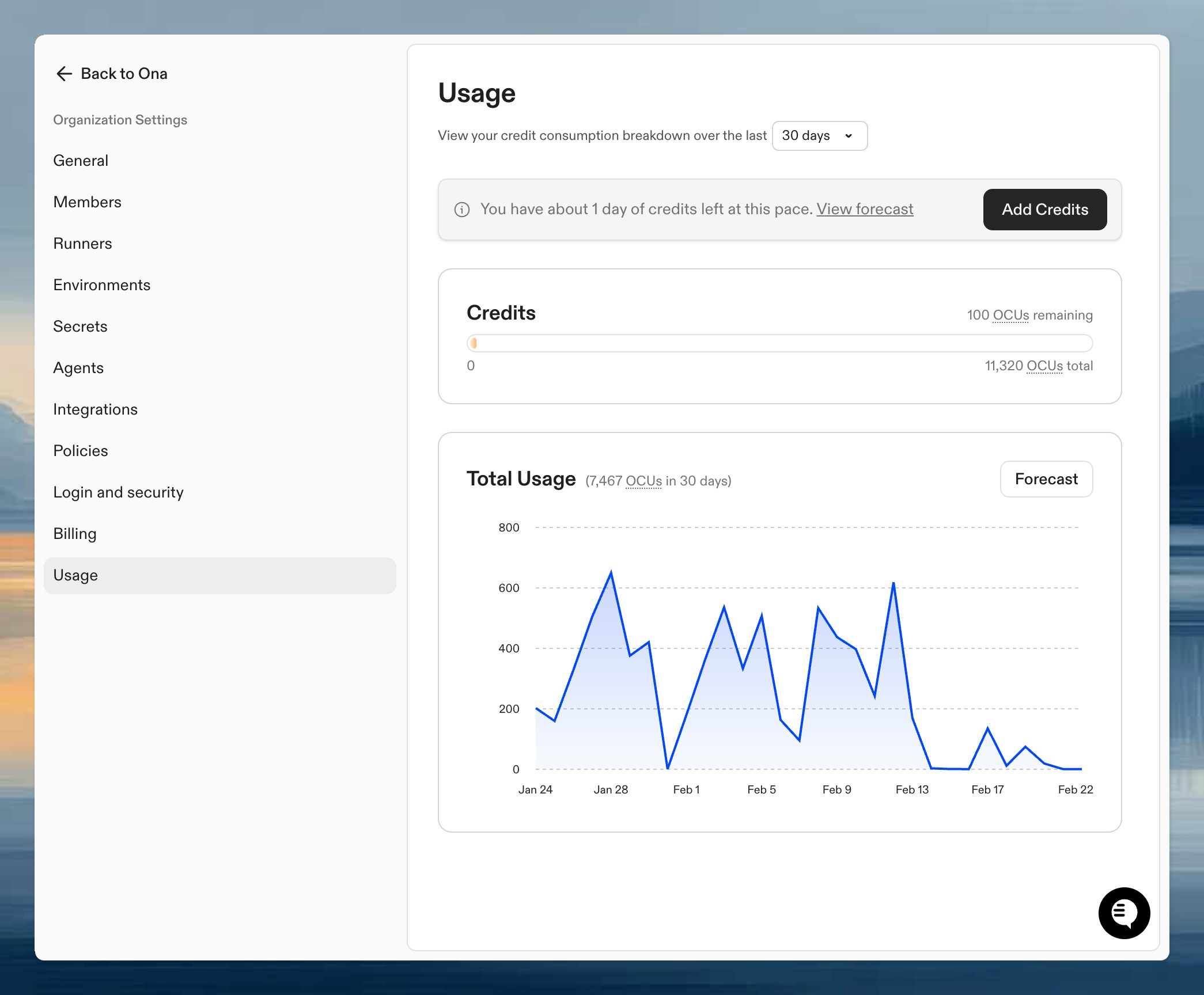 At the top, a credit summary shows your total balance, how many credits you've used, and how many are still available. Below that, a daily consumption chart breaks down your spending over time so you can spot trends or unexpected spikes.
If your credits are running low, a banner appears with an estimate of how many days you have left at your current pace so you can top up or adjust your usage before you hit zero.
Enterprise organizations can query this data programmatically with the [Ona Intelligence usage API](/docs/ona/billing/ona-intelligence-usage-api), or the [AI cost usage API](/docs/ona/billing/cost-usage-api) for organizations that bring their own provider keys (BYOK).
## Credit expiration
* **Core subscription credits** renew monthly as long as your subscription is active. They do not roll over.
* **Top-up credits** are valid for up to 1 year while you have an active subscription. Without an active subscription, top-up credits expire when the subscription ends.
* **Usage order**: Subscription credits are consumed first, then top-up credits. Bonus/gift credits are used last and typically have a longer expiration.
## Running low on credits?
* [Enable auto top-up](/docs/ona/billing/overview#automatic-credit-top-up) to add credits automatically when your balance is low
* [Top up credits](/docs/ona/billing/overview#credit-top-up) for a one-time purchase
* [Review Core subscription options](/docs/ona/billing/overview#core-subscription) for more monthly credits
## Next steps
* [Billing overview](/docs/ona/billing/overview) - Manage subscriptions and payments
* [Organizations overview](/docs/ona/organizations/overview) - Understand where usage is owned and administered
At the top, a credit summary shows your total balance, how many credits you've used, and how many are still available. Below that, a daily consumption chart breaks down your spending over time so you can spot trends or unexpected spikes.
If your credits are running low, a banner appears with an estimate of how many days you have left at your current pace so you can top up or adjust your usage before you hit zero.
Enterprise organizations can query this data programmatically with the [Ona Intelligence usage API](/docs/ona/billing/ona-intelligence-usage-api), or the [AI cost usage API](/docs/ona/billing/cost-usage-api) for organizations that bring their own provider keys (BYOK).
## Credit expiration
* **Core subscription credits** renew monthly as long as your subscription is active. They do not roll over.
* **Top-up credits** are valid for up to 1 year while you have an active subscription. Without an active subscription, top-up credits expire when the subscription ends.
* **Usage order**: Subscription credits are consumed first, then top-up credits. Bonus/gift credits are used last and typically have a longer expiration.
## Running low on credits?
* [Enable auto top-up](/docs/ona/billing/overview#automatic-credit-top-up) to add credits automatically when your balance is low
* [Top up credits](/docs/ona/billing/overview#credit-top-up) for a one-time purchase
* [Review Core subscription options](/docs/ona/billing/overview#core-subscription) for more monthly credits
## Next steps
* [Billing overview](/docs/ona/billing/overview) - Manage subscriptions and payments
* [Organizations overview](/docs/ona/organizations/overview) - Understand where usage is owned and administered